 tpaw
tpaw
macOS 13 Ventura or later required · Not available on Windows or Linux
The database tool built for founders.
Connect, browse, and edit your PostgreSQL databases in a native Mac app that launches in under a second. Free forever — no account, no license key.
tpaw (pronounced “tee-paw”) is a free, native macOS database management GUI focused on PostgreSQL. Built by a developer who needed a better tool for daily work — and opened up for everyone.
100% local · No telemetry · No account · Free forever
100%
Local
<1s
Cold start
~140MB
App size
0
Data collected
$0
Forever
Measured on Apple M2 MacBook Air, macOS 14 Sonoma. App size as of v1.5.2 (.dmg).

What can tpaw do?
Every feature here exists because our team needed it. Nothing speculative — just tools we use every day.
100% Local
tpaw runs entirely on your Mac. Your queries, credentials, and data never leave your machine — no cloud relay, no third-party servers, no telemetry. Nothing to leak.
Command Palette
Press Cmd+K to jump to any table, view, saved query, or action. No menus, no clicking — just type what you need. Like Raycast, but for your database.
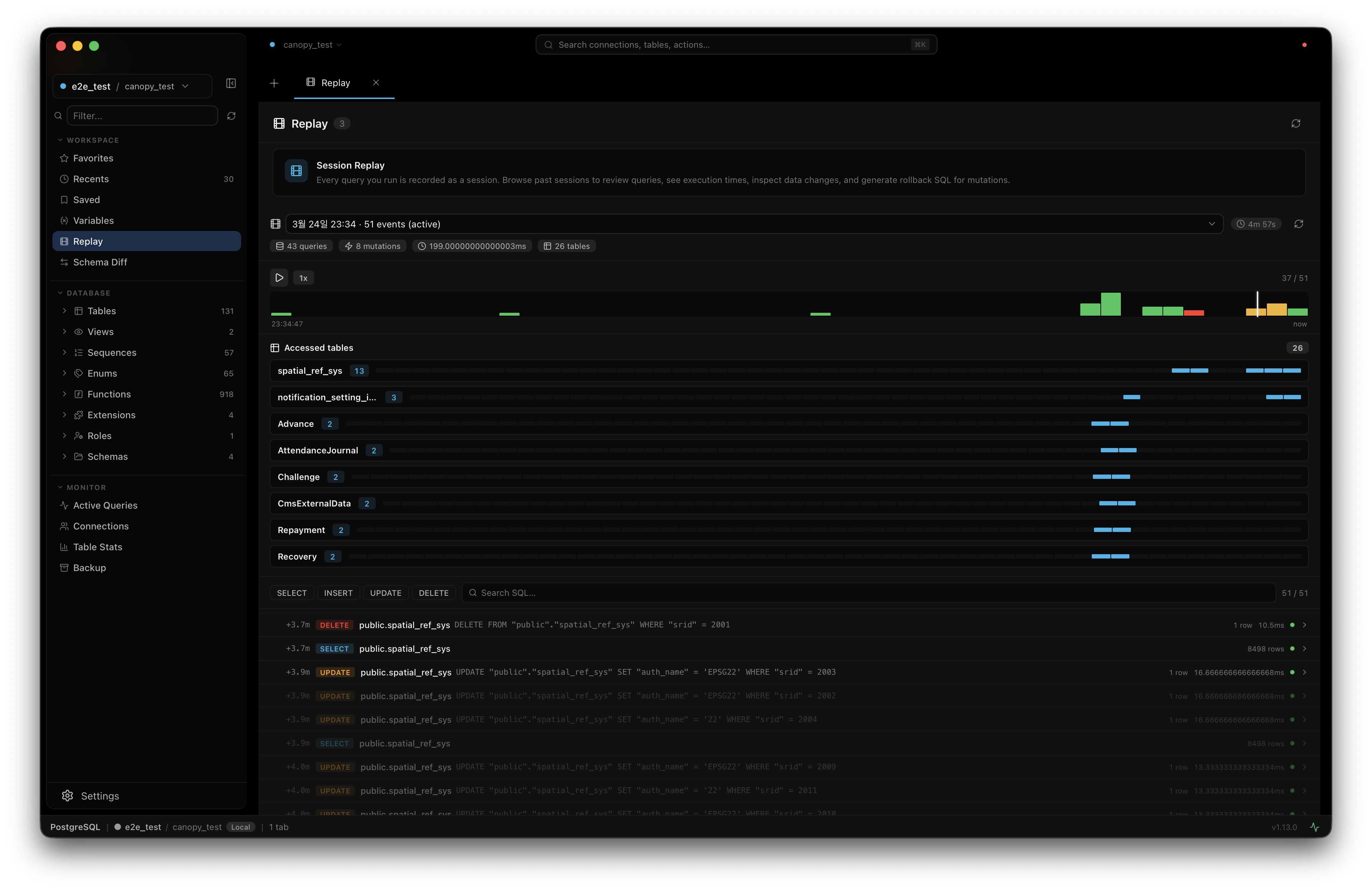
Session Replay
Every query, mutation, and data browse is recorded automatically. Step through your session timeline to review what happened — and when.
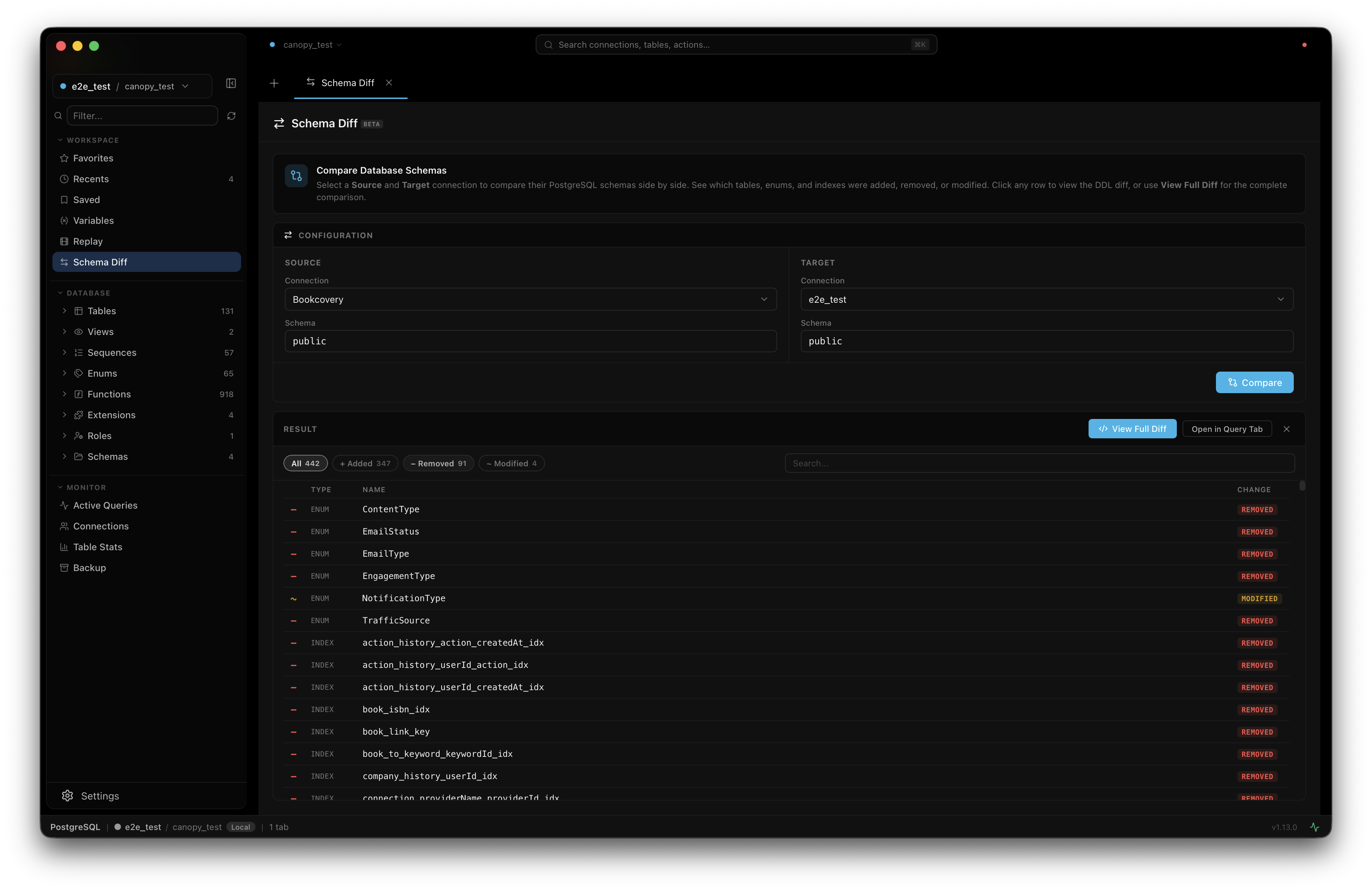
Schema Diff
Compare schemas between two database connections side by side. See what changed — powered by the Atlas diff engine. Free, not locked behind an enterprise paywall.
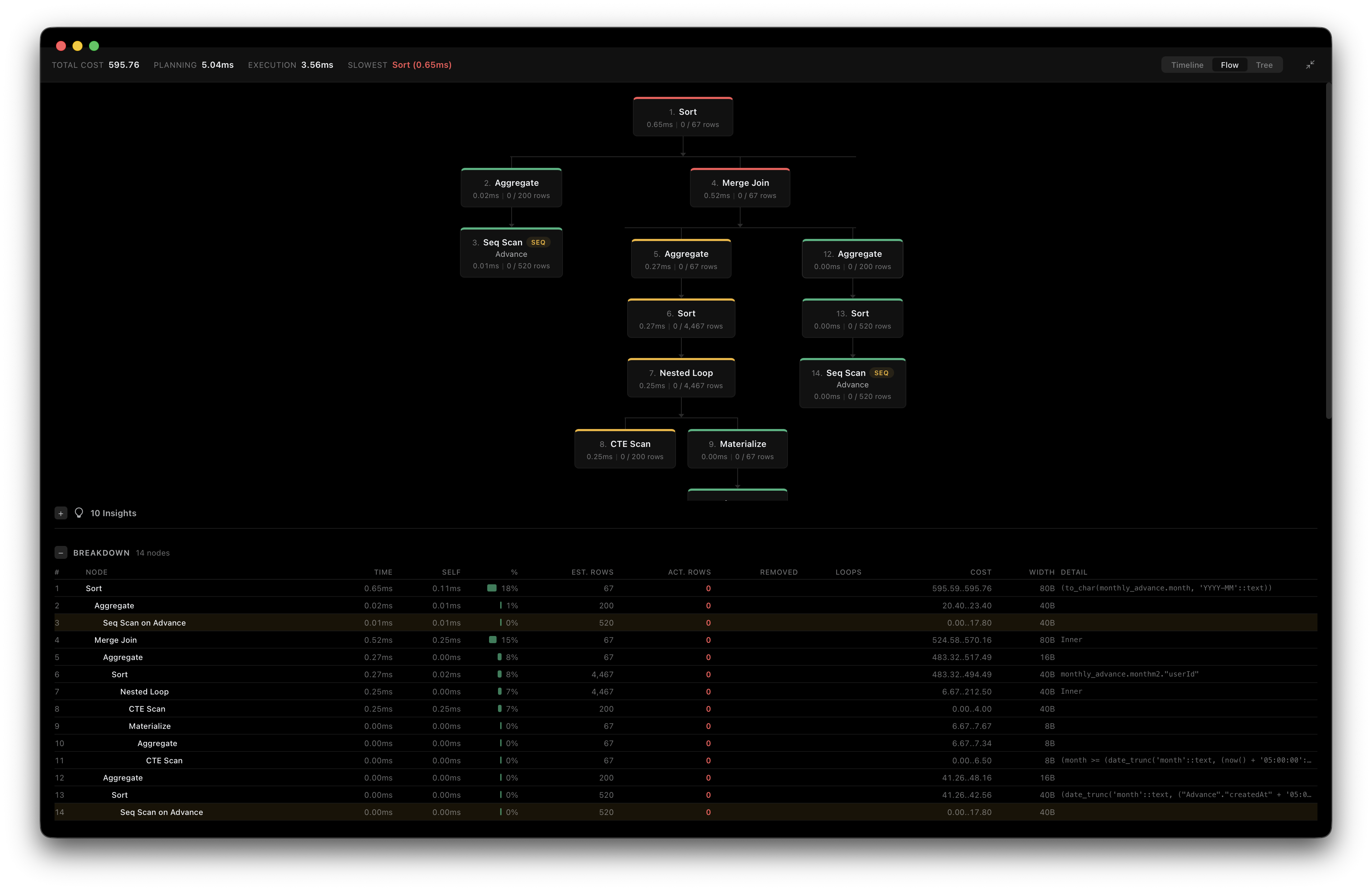
Visual EXPLAIN
Run EXPLAIN ANALYZE and see the query plan as an interactive tree. Each node shows cost, rows, and actual time — color-coded so bottlenecks jump out.
Cloud Quick Connect
Paste a connection string from Supabase, Neon, Railway, or Render — tpaw auto-detects the provider, sets SSL, and fills every field. Connected in 3 seconds.
JSONB Tree Editor
Expand any JSONB cell into a full tree view. Edit values inline, add keys, delete nodes, search with Cmd+F — and copy the JSON path from any node.
Features only tpaw has.
Built because we needed them. Now you can use them too.
Every action, recorded automatically.
Session Replay
tpaw records every query, mutation, and data browse as you work. Open the Replay timeline to step through exactly what happened — what was run, when, and what changed. No setup required.
- Queries, mutations, and DataGrid events on a visual timeline
- Diff view shows before/after for every change
- Filter by event type to find what you need
See why your query is slow.
Visual EXPLAIN
Run EXPLAIN ANALYZE and get an interactive plan tree instead of a wall of text. Each node is color-coded by cost — expensive operations stand out immediately.
- Interactive tree with Node Type, Cost, Rows, Actual Time
- Color-coded nodes — red means expensive
- Planning Time + Execution Time summary bar
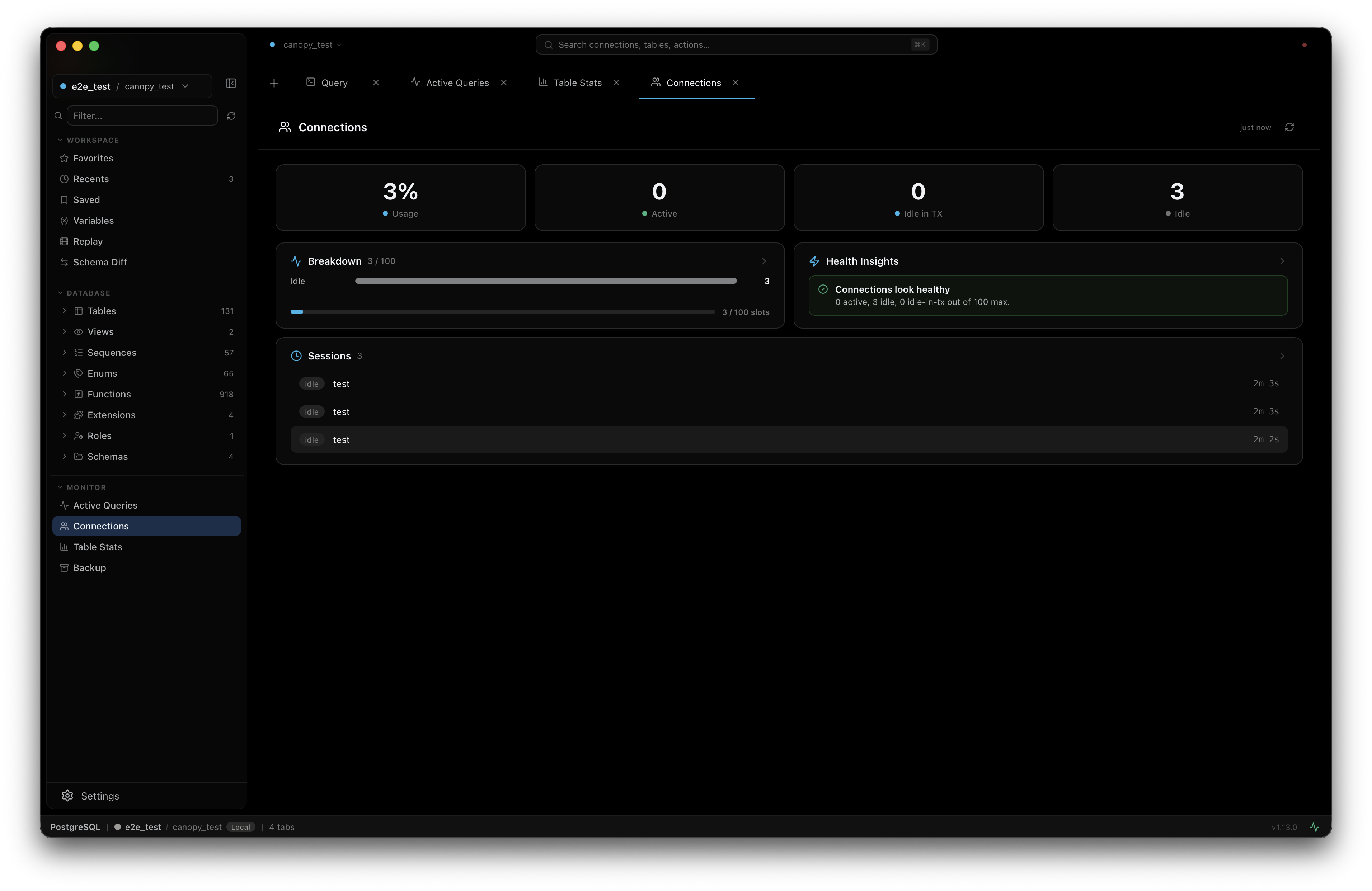
One less tool to install.
Monitoring Dashboard
Active queries, slow query detection, lock contention, resource usage, table vacuum status, and backup recovery — all in a real-time dashboard with 5-second polling. No Datadog, no pgHero, no separate monitoring stack.
- Active queries with duration, client info, and query text
- Slow query detection with automatic highlighting
- Lock contention analysis — see which queries are blocking others
- Table vacuum and bloat stats at a glance
Compare two databases in seconds.
Schema Diff
Pick any two connected PostgreSQL databases and diff their schemas. tpaw shows an object-level summary — which tables, columns, indexes, and constraints differ — plus a full DDL diff in Monaco editor. Powered by the Atlas schema diff engine.
- Side-by-side connection picker — compare prod vs staging in one click
- Object-level summary table: added, removed, changed at a glance
- Full DDL diff with syntax highlighting (Monaco DiffEditor)
- No paywall — available to everyone, not just enterprise users
Never DROP a production table again.
Production Safety
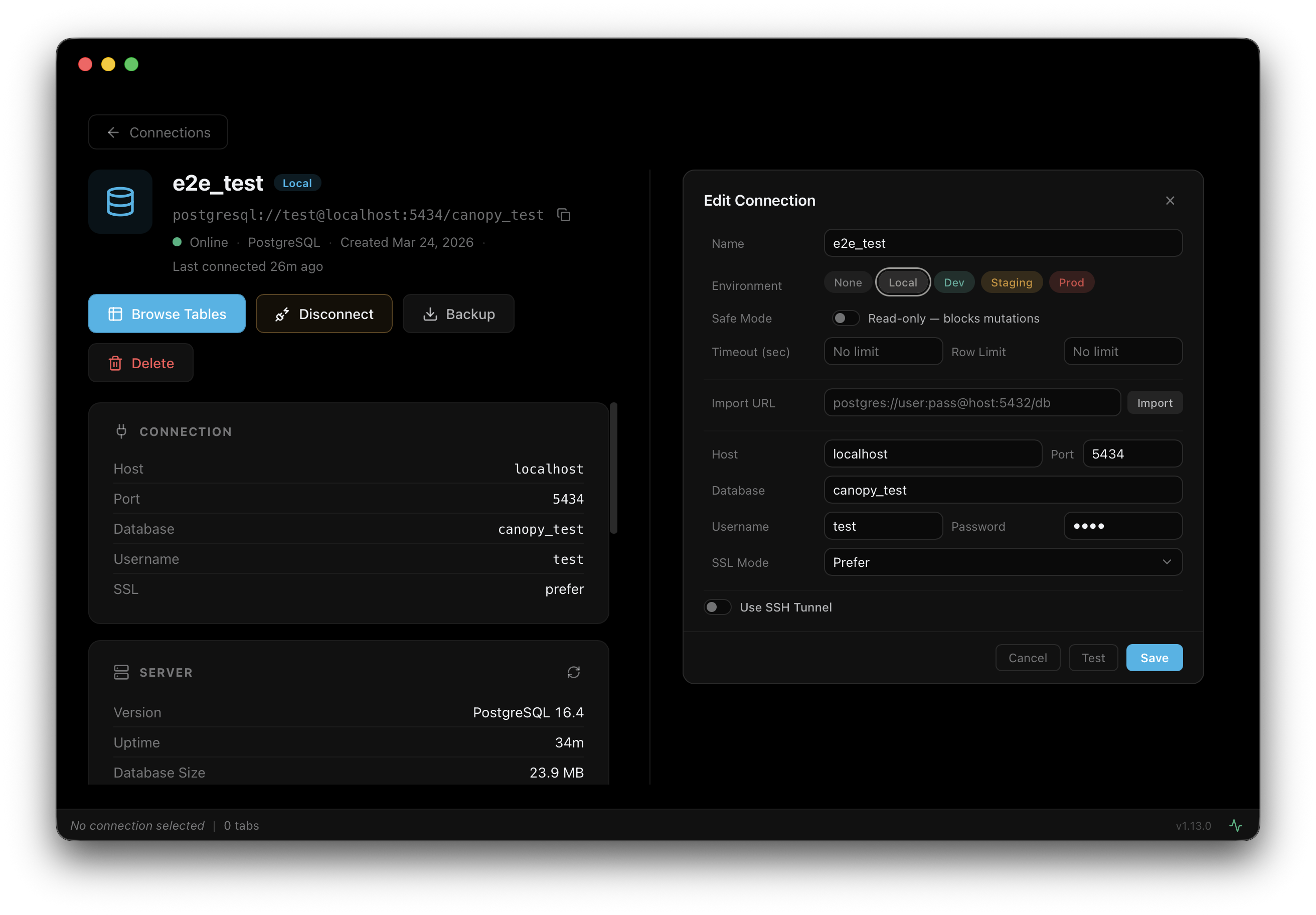
tpaw treats production databases differently. Tag connections with an environment — production glows red everywhere in the UI. Enable Safe Mode to block all writes entirely. Run a destructive query and tpaw asks you to confirm before executing.
- Environment tags: production (red), staging (yellow), dev (teal), local (gray)
- Safe Mode — one checkbox to make a connection fully read-only
- Statement timeout per environment — production 30s, staging 60s, dev 120s
- Dangerous query detection — DROP/TRUNCATE require typing the object name to confirm
- Auto row limit — production caps SELECT at 1,000 rows by default
All included. All free.
Ready to try it?
Download tpaw and connect to your PostgreSQL database in under a minute. No account, no trial period, no feature gates.
Download for MacmacOS 13 Ventura or later · Free forever
How does tpaw compare?
Pricing as of March 2026. Verified from each vendor's public pricing page.
| Feature | tpaw | TablePlus | DataGrip | DBeaver |
|---|---|---|---|---|
| Price | Free | From $99 | From $99/yr | Free / Paid tiers |
| Native macOS (not JVM, not Electron) | ||||
| No account required | License key | JetBrains account | ||
| All features free (no paywalled tiers) | ||||
| Session Replay | ||||
| Schema Diff | Paid | Enterprise only | ||
| Visual EXPLAIN plan tree | ||||
| Supported databases | PostgreSQL only | 20+ | 20+ | 80+ |
| Real-time monitoring dashboard |
Pricing as of March 2026, sourced from each vendor's public pricing page. TablePlus: from $99 lifetime license (1 yr updates). DataGrip: from $99/yr individual (JetBrains Toolbox). DBeaver: Community Edition free; Lite/Enterprise/Ultimate/Team are paid tiers.
Where tpaw is headed.
We build what our team needs next. Here's what's done, what's in progress, and what's coming.
Roadmap reflects current plans and may change based on what our team needs most.
Why is tpaw free?
Most good database GUIs cost $99 or more per year. tpaw doesn't. Here's why.
tpaw was built by a developer for their own daily work. It solved a real problem — and when it worked well enough, it was just opened up for everyone.
There is no investor, no board, and no revenue target. The tool exists because it's useful, not because it needs to make money.
tpaw runs entirely on your Mac. There is no cloud relay, no analytics, and no telemetry. Your queries, connections, and credentials never leave your machine — nothing to leak, nothing to breach.
tpaw will remain free for individual developers. Period.
Download tpaw.
Free for macOS 13 Ventura or later.
No account. No license key. No trial period. Just download, open, and connect.
Apple Silicon · macOS only · Not available on Windows or Linux
Frequently asked questions
Everything developers ask before downloading tpaw.
- Why is tpaw free?
- tpaw started as an in-house tool built by a developer for their own daily database work. When it worked well enough, it was opened up for everyone. There is no VC funding, no monetization plan, and no telemetry in the app.
- What databases does tpaw support?
- tpaw supports PostgreSQL with deep schema browsing, monitoring, and inline editing.
- Does tpaw require an account or subscription?
- No. tpaw requires no account and no subscription. Just download and connect to your databases.
- Is tpaw safe to use with production databases?
- Yes, and tpaw has built-in safeguards for production use. Mutation Mode shows a confirmation dialog before running any INSERT, UPDATE, DELETE, ALTER, DROP, or TRUNCATE statement. Environment tags color-code connections so production is visually distinct from staging. Read-only connections refuse all write operations. And because tpaw runs 100% locally, your credentials and query results never leave your machine.
- Does tpaw work with Supabase, Neon, or Railway?
- Yes — tpaw connects to any PostgreSQL database that accepts standard connections, including managed services like Supabase, Neon, Railway, Render, and Fly.io Postgres. Uses the connection string or host/port/user/password from the provider's dashboard.
- Does tpaw work with AWS RDS and Google Cloud SQL?
- Yes. Works with RDS, Aurora (PostgreSQL-compatible), Google Cloud SQL for PostgreSQL, Azure Database for PostgreSQL, and Supabase. Supports SSH tunnel for databases inside private networks.
- Is tpaw available for Windows or Linux?
- No. tpaw is a native macOS-only application built specifically for Apple platforms. There are no plans for Windows or Linux versions. Requires macOS 13 Ventura or later.
- How is tpaw different from psql?
- psql is a command-line tool that ships with PostgreSQL. tpaw is a graphical application with a schema browser, inline-editable data grid, visual query explain, schema diff, and a database monitor. Both can coexist — many developers use tpaw for exploration and psql for scripted workflows.
- Does tpaw support SSH tunnels?
- Yes. tpaw has built-in SSH tunnel support for connecting to databases inside private networks. Configure the tunnel host, port, user, and key in the connection dialog — no external tunneling tool required.
- Where can I report bugs or request features?
- Open an issue on GitHub at github.com/canopy-io/tpaw/issues. The project is actively maintained and user feedback drives the roadmap.